



.png)




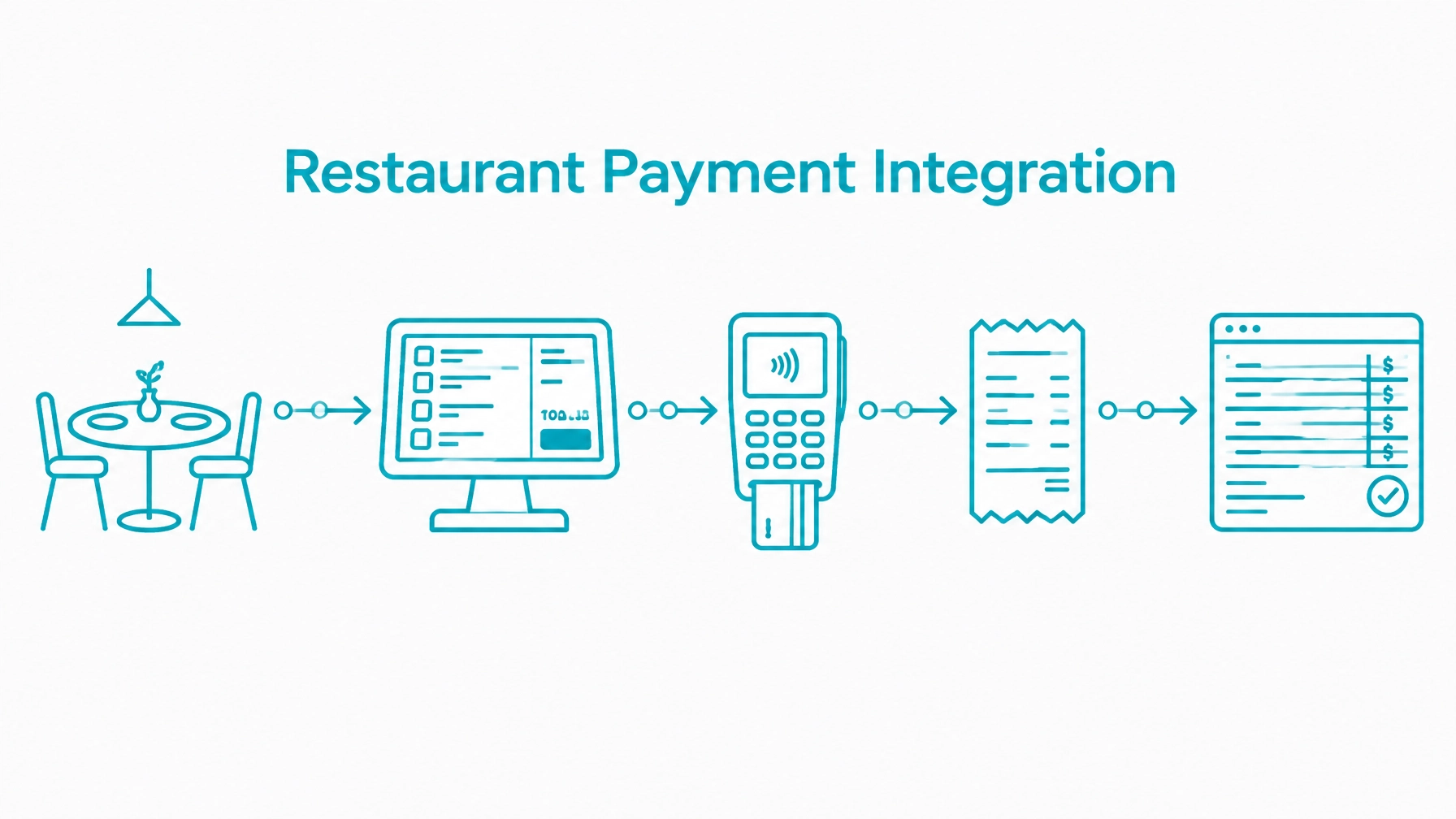
Restaurant payments are not generic checkout with a different label. A restaurant produces many small, frequent, parallel transactions across several ordering channels, while amounts can change after authorization and funds must reconcile across staff, shifts, tips, batches, and payouts.
Generic payment integrations break when they assume one customer, one order, one payment, and one final amount. A restaurant POS must model open tickets, table transfers, split checks, tip adjustments, terminal interactions, refunds, and settlement timing as separate workflows.
This article explains the payment architecture developers should plan before building custom restaurant POS software, table-ordering applications, kiosks, or restaurant ecommerce.
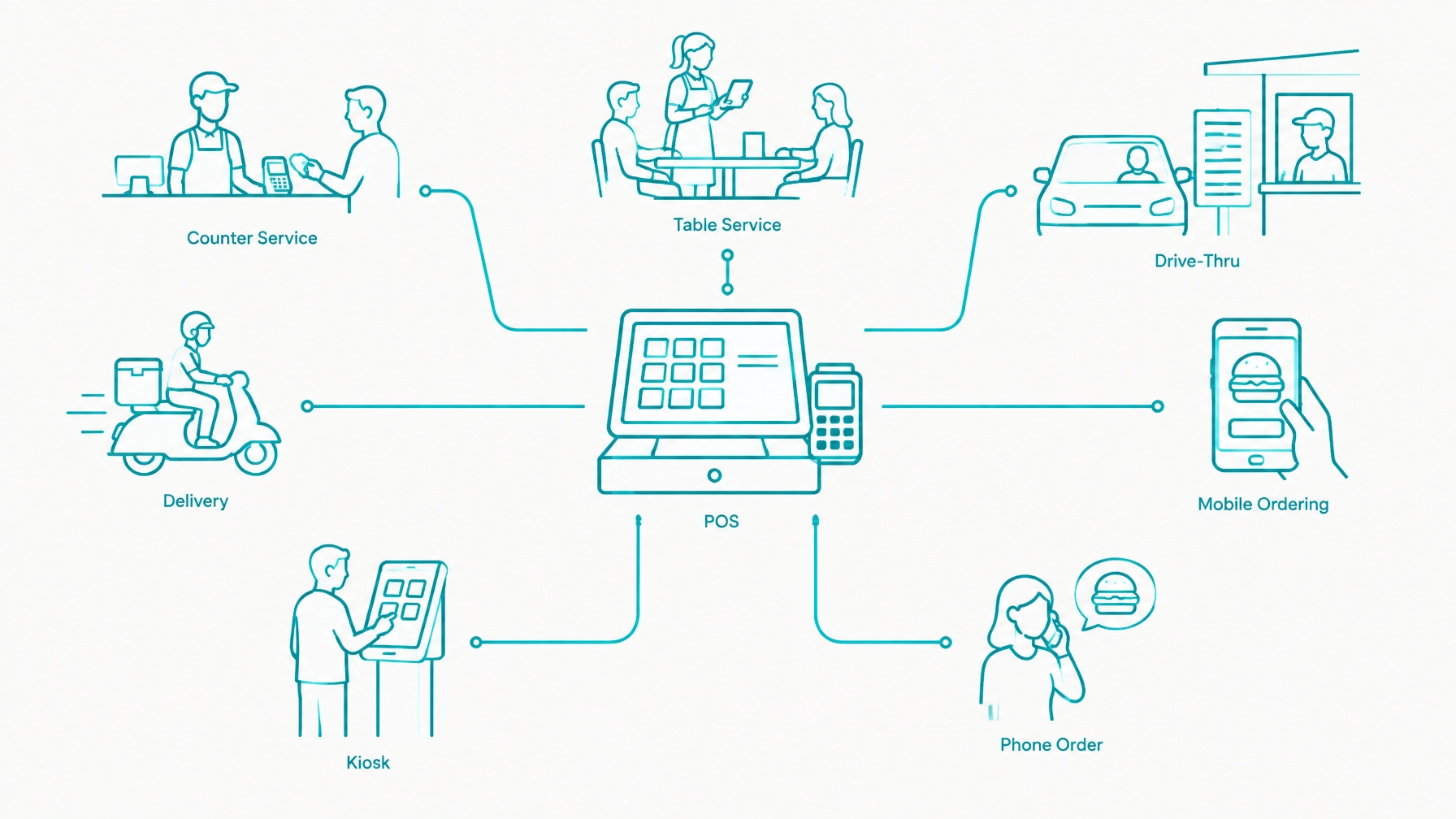
Start by mapping every channel that will create a ticket or order. Counter service, table service, drive-thru, delivery, mobile ordering, kiosk payments, and phone orders may all use the same merchant account, but they do not have the same payment requirements.
The restaurant POS payment integration resources provide useful context for software teams building payment capabilities into restaurant management systems. Teams also planning self-service ordering should review guidance on unattended payment devices for kiosks.
Each channel has different latency, tip, and reconciliation needs:
Treat the channel as part of the payment record. It affects fulfillment, tip rules, device selection, reporting, and reconciliation.
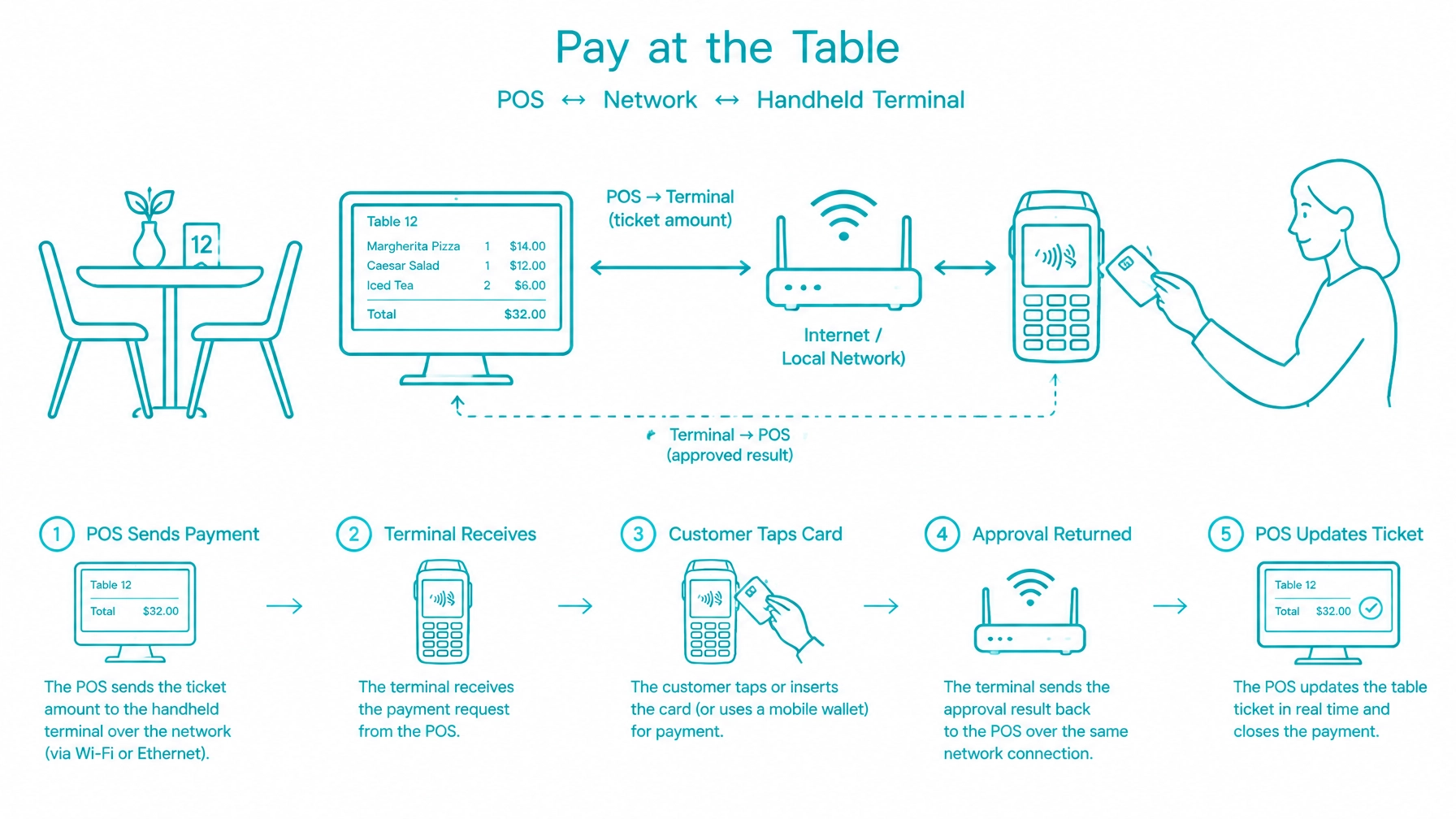
For pay-at-the-table, the POS should communicate with a card-present payment device over the network through a dedicated payment device integration layer. Modern integrated terminals are IP-connected devices that join the same network as the POS — over Wi-Fi, Ethernet, or cellular failover — and are addressed directly by the POS application through the device vendor's supported interface. Keep this layer separate from menu, table, kitchen, employee, and ticket logic, but treat the device connection as a first-class application service rather than an accessory.
A typical workflow includes:
Because the device and the POS communicate over the network, an approved transaction is reflected on the ticket immediately and reconciles in real time. The POS does not need to wait for a batch report or re-enter totals at the end of the day. The device result, the gateway transaction, and the POS payment record should agree within the same interaction, and the identifiers returned with that result are what keep the records linked.
The POS should not become the cardholder data environment. Use a gateway-controlled device flow or tokenized collection model so the application manages business data without storing full card numbers or CVV values, and consider a hosted payment experience where it fits the channel.
Plan for the exception path as well. Network drops, device resets, duplicate submissions, canceled sessions, and delayed responses can still occur on any network, so design for device connectivity failures and model reconnection explicitly. Where offline or store-and-forward processing is supported, treat it as a fallback rather than the primary flow, and model it as a distinct pending state that reconciles against the gateway once connectivity returns.
The Integrate Payments developer documentation contains the current device and transaction details. Use that documentation for exact supported operations and values.
Restaurant payment logic starts with the operational model of the dining room. Floor plan, section, table status, and server assignment are operational records, but the payment layer still needs to link to them so every authorization, payment, adjustment, and refund can be traced back to the exact service context.
Seat-based ordering matters because a future split should not depend on re-keying a finished check. When items are attached to a specific guest as they are ordered, the POS can split by seat later without losing tax, modifier, or tip attribution. That structure also improves payment gateway integration for restaurant point of sale software because the payment layer can consume a stable ticket structure instead of reverse-engineering a final total.
Table transfer and table merge are payment events as much as they are dining-room events. If a party moves tables or two checks merge, any existing authorization, open tab, or partial payment must follow the ticket relationship so staff do not lose the payment reference that supports later capture, tip adjustment, void, refund, or reconciliation.
Course assignment and course firing add another reason not to treat the first ticket total as final. Items may be held and released to the kitchen in sequence, and a later course can change the amount long after the table was opened. Item modifiers, substitutions, allergy notes, and price deltas from modifiers must also flow through to the payment view of the ticket rather than living only in kitchen logic.
Every one of these events changes the ticket amount or the ticket structure. The order and ticket layer should stay separate from the payment layer, with the payment layer subscribing to ticket change events and consuming ticket revisions instead of snapshotting a single total.
Track the operational relationships explicitly:
Keep the payment consequences explicit as well:
A restaurant may authorize payment at the beginning or end of a meal. A bar tab may require an initial hold, followed by additional authorizations or a later capture as the order grows.
Opening a bar tab usually starts with an initial pre-authorization hold. That hold verifies available funds and lets the restaurant continue service without retaining the physical card, but it does not finalize the sale. The POS should model the hold as its own state and keep it linked to the guest, the ticket, and the service context.
An open tab may move with the guest. If a bar tab becomes a dining-table ticket, the authorization should follow the ticket to the new table so the application preserves one payment history instead of creating disconnected records that later complicate capture and reconciliation.
Keep the ticket open while items, modifiers, discounts, service charges, and tips can still change. As the running total grows, the POS must detect when it has passed the original hold amount and decide whether an incremental authorization, reauthorization, or another payment action is required.
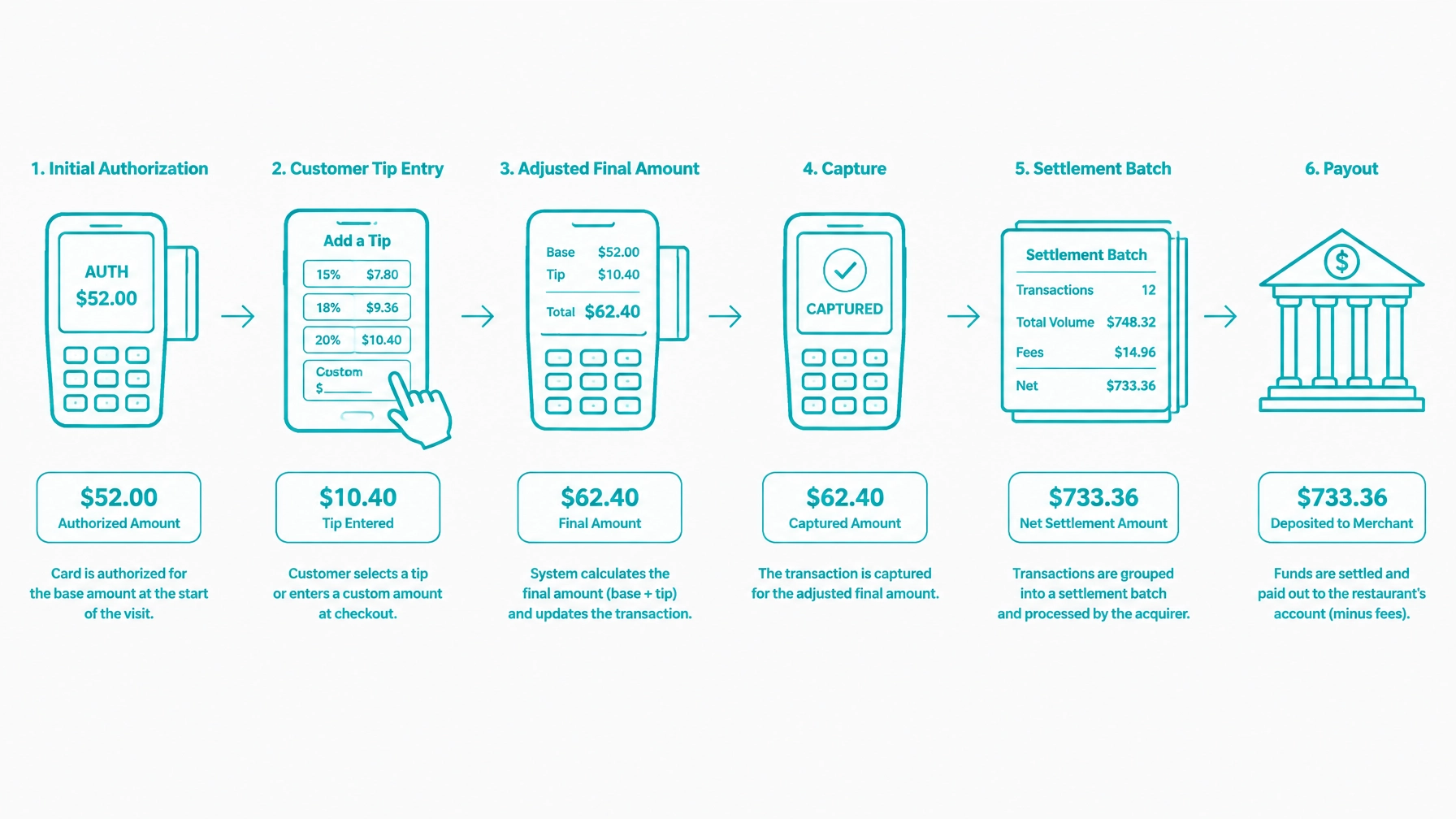
The POS must distinguish between authorization, capture, and settlement. An authorization reserves funds, a capture submits the amount to be collected, and settlement determines when that captured amount moves through batch funding and payout reporting. If these states collapse into one field, the application will not handle tabs, delayed closeout, tip adjustment, or refunds correctly.
If the guest closes out below the original hold amount, the unused portion of the hold should be released or voided according to the supported workflow. If only part of the requested amount is approved, surface that partial approval to the operator immediately rather than silently reducing the ticket and creating an unexplained balance.
Track these amount concepts separately:
Incremental authorization or reauthorization should be treated as a workflow decision. When the open ticket exceeds the original hold, the POS must determine whether the processor permits an additional authorization, whether the original authorization can be extended, or whether a new payment action is required.
Do not invent processor-specific parameter names in the application model. Store the business event and map it to the documented gateway operation.
Tip handling is the central difference between many restaurant payments and ordinary ecommerce payments. The customer may enter a tip before submission, select a suggested percentage on the terminal, or add a tip after the initial authorization.
The POS must distinguish between:
A tip adjustment changes the amount that settles after authorization. It is not the same as a refund, and it should not overwrite the original authorization record.
Support these cases:
Only permit adjustments within the limits and time windows defined by the processor. Store the original amount, adjusted tip, final amount, adjustment timestamp, employee attribution, and adjustment result.
One payment does not always equal one ticket. A table may split by item, seat, equal share, custom amount, or payment method.
The POS should support multiple payment records against one ticket and maintain the remaining balance after every attempt. A ticket can be open, partially paid, or fully paid without losing the relationship between the parent ticket, child checks, and payment records.
Support mixed tender, such as card plus cash, and allow a payment to remain open when one guest has paid while another guest is still deciding. Use explicit allocation records when assigning tips, items, taxes, discounts, or service charges to split checks, especially in platform and marketplace payment processing models.
A void reverses an unsettled transaction or authorization. A refund reverses a settled or pending-settlement transaction. These actions have different timing, permissions, reporting, and reconciliation effects.
A partial refund should identify the affected item, amount, tax, tip treatment, reason, and originating payment. A comped item is not necessarily a payment refund; it is an operational adjustment that should remain visible in the POS.
Record the reason for every comp, discount, void, and refund. Preserve the original ticket total and show how the adjusted total was calculated so end-of-day reporting does not silently absorb differences, consistent with broader guidance on integrating payments into custom software.
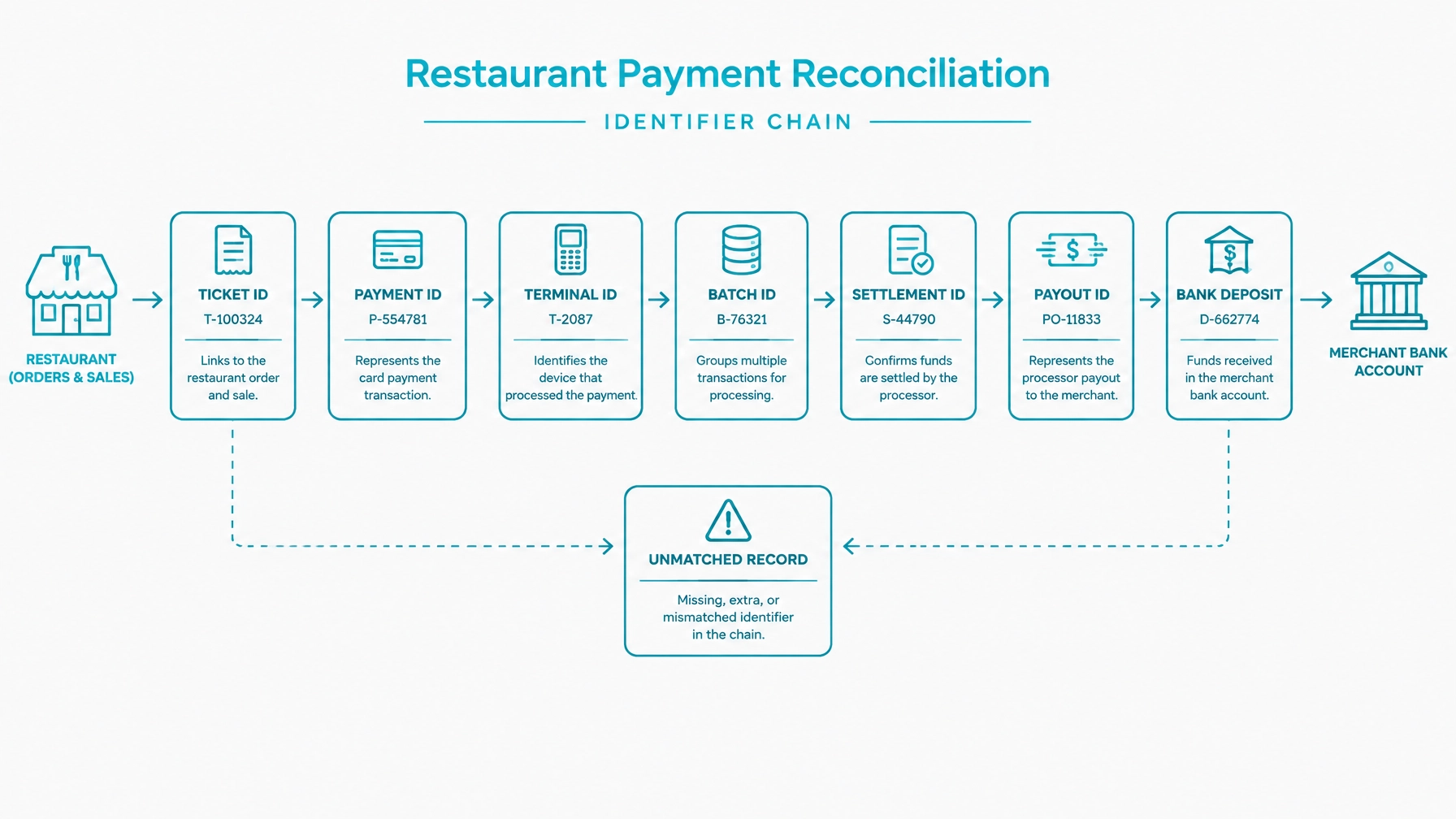
Reconciliation is often the least-developed restaurant workflow. With network-connected integrated devices, most of this chain is populated automatically as transactions are processed, so reconciliation becomes a continuous verification process rather than a manual reconstruction at end of day. Build it across three layers:
Maintain an identifier chain:
Use the chain to reconcile shift close, end-of-day close, cash totals, card totals, tips, refunds, voids, and over/short amounts. Surface unmatched records for review. Mark a ticket paid from the confirmed result returned through the device and gateway connection, not from an unverified local signal, and keep every identifier that result provides so the chain stays intact.
Settlement batching affects when restaurant transactions appear in funding reports. A late-night close may cross midnight, and weekend or holiday cutoffs may move a transaction into a later payout.
Do not use calendar date alone to define a restaurant day. Store business date, transaction timestamp, shift, batch, and settlement status separately.
Tips and adjustments can increase the settled amount after the original authorization. The payout should not be assumed to equal the authorized total, especially when moving a payment integration from sandbox to production.
Restaurant software cannot stop when internet connectivity drops. A practical architecture combines local operational continuity with cloud-connected payment services, but the POS must still distinguish between work accepted locally and payments confirmed through the gateway.
A locally accepted payment is not the same as a settled payment. If the connection drops during authorization, capture, or device communication, the payment should move into a distinct pending state and remain there until the application confirms the gateway outcome after connectivity returns.
Store-and-forward should be treated as a controlled fallback. Queue device and payment events for replay, make replay idempotent, and ensure that a reconnect does not create duplicate charges, duplicate captures, or duplicate ticket updates. This matters whether the application is using countertop devices, pay-at-the-table flows, or smartphone credit card processing solutions for mobile staff workflows.
Device and terminal reachability should be monitored continuously. Reconnection should be automatic where supported, and operators should see a clear degraded-mode indicator so staff know whether the device is live, whether the gateway is reachable, and whether a payment is still pending confirmation.
Permissions also need to be explicit. Capture, void, refund, tip adjustment, discount, comp, and reporting actions should be restricted by role, and every sensitive action should be attributed to an employee so the restaurant can investigate exceptions, losses, and disputed adjustments.
Multi-location deployments add another layer. Each store, kitchen, or service unit may need its own device registration, reporting scope, and storefront mapping even when payments ultimately post to a common merchant account. Keep location context on every ticket, order, device, and payment record.
Design for these resilience requirements:
Restrict these actions by role and attribution:
The online channel is where restaurant ecommerce and in-restaurant operations meet, and it is worth treating it as its own integration surface rather than an extension of counter checkout. A web, app, or kiosk order arrives from outside the dining room but still has to land in the same kitchen, the same menu, the same tax logic, and the same settlement reporting as everything else the restaurant sells.
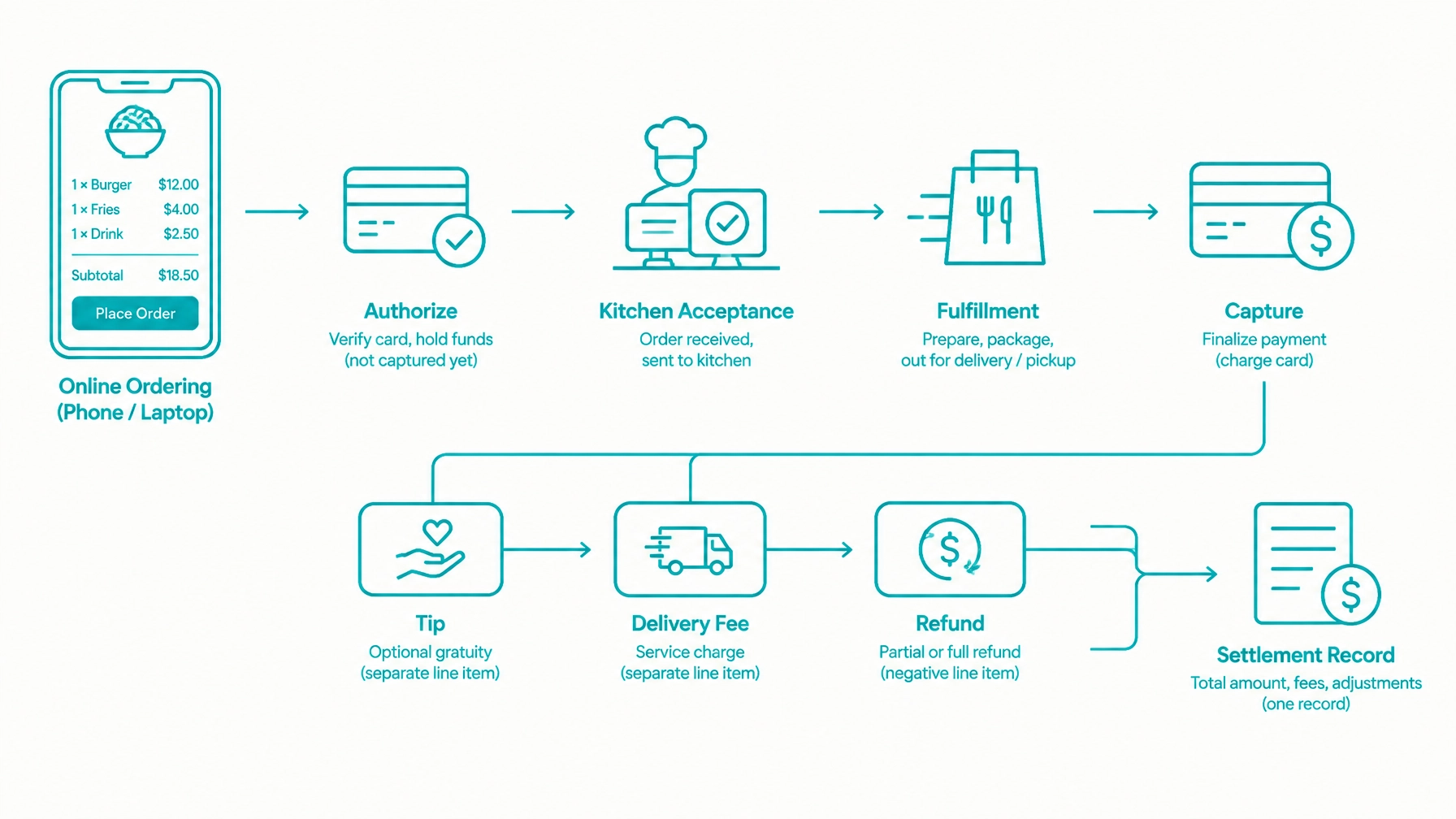
From the POS perspective, the important thing is where the payment state enters the operational workflow. Online orders are typically authorized while the guest is still on the website or in the app, but the amount that ultimately settles depends on what the kitchen actually produces. Substitutions, unavailable items, modifier changes, added delivery fees, and post-order tips all move the final amount away from the estimated total taken at checkout. The POS should therefore keep a clear line between the amount that was authorized at checkout and the amount captured at fulfillment, rather than collapsing them into one paid figure the moment the order is accepted.
That single decision drives most of the rest. If the order is captured before the kitchen has committed to it, every reasonable change becomes a refund instead of an adjustment. If the order is released to the kitchen on the strength of a browser response rather than a confirmed gateway result, the restaurant starts producing food against a payment that may not have completed.
Fulfillment mode is the other variable. Pickup, curbside, in-house delivery, third-party handoff, catering, and dine-in pre-order all place the capture point at a different moment in the order's life, so the mode belongs on the order record and should drive payment timing rather than being inferred later from staff notes.
Operationally, the POS also inherits everything the online channel generates: kitchen rejection, partial fulfillment, cancellation before or after production, fee and tip refunds, and the wider gap between order time and settlement time. Those show up as unmatched records at reconciliation if the order record does not carry a stable identifier chain back through the authorization, the capture, any adjustments, and the eventual payout line.
For the full treatment of the online channel — ordering surfaces, checkout strategy, authorize-versus-capture timing, order lifecycle states, delivery zones and fees, throttling and scheduled orders, online tipping, gift cards and loyalty, and card-not-present risk controls — see the dedicated guide on restaurant online ordering payment integration.
Restaurants may need stored payment methods for catering customers, corporate accounts, event deposits, repeat ordering, and house accounts. Use the Customer Vault for permitted payment references instead of storing full card data in the POS database.
House accounts and corporate invoicing may settle on account rather than by card at the time of service. In those cases, the card on file may act as a fallback rather than the primary tender, but the order, ticket, and payment records should still show whether the balance was paid on account, charged later, or recovered against a stored reference.
A catering workflow may include event deposits, staged balance collection, and post-event adjustments tied to guest-count changes. Event deposits should be captured against a stored reference when appropriate, with the remaining balance charged later according to the agreed billing timeline.
Repeat-order meal plans and prepaid meal credits should be tracked as balances rather than assumed subscriptions. If the restaurant offers a prepaid credit pool, the application should decrement that balance explicitly and record when residual amounts are charged to a stored payment reference.
A catering and stored-credential workflow may include:
For scheduled charges and recurring arrangements, follow the documented recurring billing API workflow. Preserve the original customer-initiated transaction reference and required consent records for any stored-credential charge.
Separate operational records from gateway actions. A useful model includes:
Model payment states explicitly, including pending, authorized, captured, settled, declined, voided, refunded, unknown, and reconciliation required. Make device requests and webhook processing idempotent so retries do not create duplicate charges, refunds, or fulfillment actions.
The ticket, order, and payment models should be separate services. The payment layer should consume ticket and order revisions rather than embedding ticket-building logic inside payment code, and every channel, including online ordering and kiosk, should post through the same payment service rather than its own isolated checkout path.
Store only permitted references and metadata. Do not store full card numbers, CVV values, raw payment tokens after use, or unfiltered gateway payloads in logs. Review guidance on PCI security for payment API integration when defining logging and storage boundaries.
Review the payment gateway integration architecture guide before finalizing the service boundaries.
Avoid these implementation errors:
Correct these decisions during data modeling. Retrofitting them after deployment creates reporting and settlement problems.
Before production, verify the following:
Restaurant software requires payment logic that matches how restaurants actually operate. Build around open tickets, tables, seats, courses, tabs, online ordering, tips, devices, shifts, settlements, and payout reconciliation rather than adapting a generic ecommerce checkout.
If you are building restaurant POS software, table-ordering applications, kiosks, catering software, mobile ordering, or restaurant ecommerce, bring your workflow map and data model to the Integrate Payments team. We can discuss the payment architecture, device workflow, online ordering design, stored-credential requirements, and path from sandbox testing to production.
Compliance disclosure: Integrations remain subject to applicable processor requirements, card brand rules, regulatory obligations, and PCI DSS requirements. Using tokenization, a hosted payment experience, or a Customer Vault does not by itself establish PCI compliance. Completing a Self-Assessment Questionnaire does not by itself establish compliance; merchants remain responsible for determining and maintaining their applicable compliance obligations.